
Project Portfolio
5 project tracking tools to achieve great results
Learn which project tracking tools are the most renowned and widely used on the market, and how to track your projects step by step.

When taking on the challenge of better project tracking, many professionals get lost along the way because they cannot put into practice the actions needed for everything to happen as planned.
This happens because the project management tool they chose cannot properly support the project’s progress and its performance indicators that point to growth.
Project tracking tools become essential for anyone who wants to stand out as a manager of initiatives that deliver results.
If you have a lean team, a tight budget and are willing to use new management resources, there are a number of solutions that may be the right choice!
In this article, you will see a list of different project tracking tools, each with a specific function!
Keep reading and learn!
The 10 project tracking tools that stand out
Remember that managing performance indicatorsopens in a new tab is one of the most important points in project management. After all, they are what make it possible to identify whether your company is on the right track to reach its strategic objectives.
See more about project management tools in this video (in Portuguese):
Why use project tracking tools?
To do strategic project tracking, project management tools need a combination of features with intuitive resources and a very clear user interface.
Before presenting some of the ones that have stood out on the market, it is important to identify options that offer differentiators for your company. Such as:
- structuring processes;
- increasing productivity;
- aligning all team members’ goals;
- simplifying quality communicationopens in a new tab;
- ensuring every step is carried out;
- alerting to the use of best practices;
- storing all the data and information generated at each stage of the project.
These are points that any project must cover, in practice, to get off the ground. Without the help of specific tools or software, it becomes practically impossible for anyone to manage and track projects with high quality.
Fortunately, there is a wide variety of solutions for project managers that help meet these specific requirements.
Now see the main tools for project management and tracking that help carry out all the stages and goals set by leadership.
Project management is an essential process in companies seeking efficiency. That is why we have prepared an article for you with the 6 best project management software options: Project management software: 6 tips to achieve better resultsopens in a new tab (in Portuguese)
10 best tools for project tracking

1. Stratws
With Stratws, you can manage projects aligned with the company’s strategy, connecting them to the strategic objectives of the Balanced Scorecard (BSC). The software also offers an intuitive view of the entire project portfolio, ideal for giving clarity to senior management.
It is also worth highlighting that among project management tools, Stratws is particularly notable for its customizable dashboards, which let users monitor project progress according to specific needs, including key performance indicators, costs, deadlines and more. This customization is crucial to fit the tool to different business contexts.
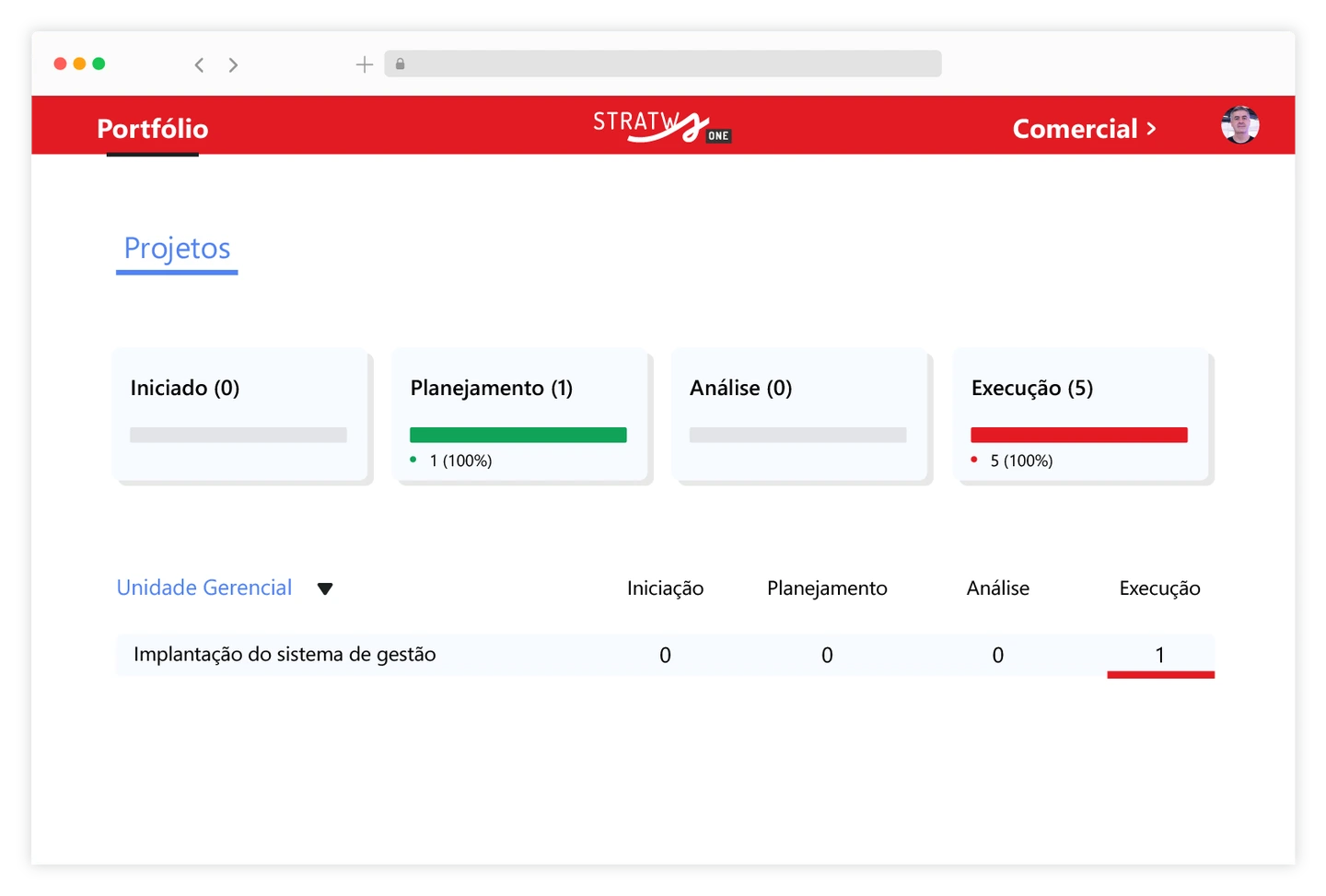
In the Siteware project tracking system, you can also link a project to indicators and, if it is not going as expected, the software lets you create an action plan. Stratws also offers clarity on who is responsible, in intuitive panels with timelines of delivery milestones, schedules and more!
Stratws can also help companies define and monitor clear objectives for each project, making sure all efforts are aligned with the organization’s strategic goals. In addition, Siteware offers comprehensive support and training, which ensures that teams can make the most of the tool and get the full benefit from it.
Discover the Project Portfolio module in Stratws →
2. Slack
Thinking about quality communication and project management tools, the ideal is to have a shared channel where all teams and members can stay in touch in an organized way, focused on the activities that need to be delivered.
With that focus, Slackopens in a new tab is one of the best tools for managing and tracking projects. This system, which can be used for free and online, aims to create opportunities for individuals or groups to interact with colleagues about work-related matters.
It is an easy-to-use app with a very simple, intuitive user interface. Each person can also create a profile, send files and read messages.
You can create private groups called “channels,” and the messages sent within them are visible only to the specific participants.
So if you need collaboration in teamwork, start using Slack as soon as possible and see results quickly.
3. Trello
To do a good job with project management tools, it is important to keep a logical sequence of tasks on a timeline. This gives you visibility into what the next stages are or what ended up behind schedule compared to the plan.
For that, Trelloopens in a new tab is an ideal project tracking tool. Using the Kanban methodologyopens in a new tab, you can create your free account, connect everyone involved and create columns according to the activities you need to follow.
It also lets you create a task list, split into columns. In each column you can add cards that represent each activity, and you can also add the due date, the person responsible, important notes and comments to give more visibility to everything that needs to be done.
4. Google Drive
Efficient project tracking requires the use of many different documents and processes. And at this point, Google Drive is the perfect tool, not only for storing information, spreadsheets and presentations.
With Google Drive, your team can share files online and do follow-ups, simultaneous edits, suggestions or improvement comments on many different file types, such as documents, spreadsheets and presentations. All so that this sharing is aimed at the expected results.
5. Google Calendar
The routine of activities during project management is really intense. For that reason, another important project management tool is Google Calendar.
It is the best system for having visibility of your work routineopens in a new tab and of your whole team. It is important to put in place a routine where everyone can indicate on the calendar which activity or meeting will take place at each moment.
That makes it much easier to assess the volume of actions each day, and it helps when choosing a free slot to add another activity.
6. Dynamics 365 Project Operations
Dynamics 365 Project Operations is a Microsoft project tracking tool that brings all aspects of project management together in a single platform.
One of the big advantages of Dynamics 365 Project Operations is its integration with other Microsoft solutions, such as Power BI and Microsoft Teams, providing a unified, collaborative experience.
The tool also makes the financial management of projects easier, with features for cost control, billing and cash flow optimization. This is especially useful for companies that deal with complex projects and need to keep a clear view of their budgets and margins.
7. Microsoft Project
One of the main features of Microsoft Project is the ability to create detailed schedules. With it, you can define tasks, assign deadlines, allocate resources and set dependencies between activities, making sure the project follows a logical flow. Gantt charts let you see the progress of each task and spot possible delays or bottlenecks clearly and visually.
Another strong point of Microsoft Project is resource management. It lets you track the availability and workload of each team member, avoiding overload and ensuring a balanced distribution of tasks.
8. Jira
One of the main features of Jira is its flexibility in creating custom workflows. You can adapt project and process tracking to the specific needs of your project or team, defining stages, transitions and rules that guide tasks from start to finish.
This is particularly useful in agile methodologies such as Scrum and Kanban, where Jira makes it easier to manage sprints, the backlog and the view of task progress on Kanban boards.
Jira also offers excellent tracking and reporting capabilities. It lets you follow task progress in real time, monitor team performance and generate detailed reports that help in decision-making.
The tool has highly customizable dashboards, where you can add charts, reports and other metrics for a clear view of project progress.
9. Microsoft Planner
The Microsoft Planner interface is based on Kanban boards, where you can create plans and organize tasks in different columns, such as “To Do,” “In Progress” and “Done.” Each task is represented by a card, which can include detailed information such as due dates, checklists, attachments and notes.
Planner’s simplicity makes it accessible to everyone, regardless of their level of experience in project management.
One of the big advantages of Microsoft Planner is its integration with other Microsoft 365 tools, such as Outlook, Teams and SharePoint. This lets teams track task progress directly from their emails or chat rooms, making collaboration smoother.
10. Smartsheet
Smartsheetopens in a new tab is a project management and collaborative work tool that stands out for its intuitive interface and versatility.
It combines the familiarity of spreadsheets with advanced management features, offering a powerful solution for teams of all sizes and industries. If you are used to spreadsheets, you will feel at home with Smartsheet, with the advantage of extra resources to improve efficiency and collaboration.
One of Smartsheet’s main features is its customization capability. You can create projects, task lists, schedules and even custom forms for collecting information.
How to do project tracking?
Project tracking is an essential practice to make sure project goals are reached efficiently and effectively. This process involves monitoring, reviewing and regulating all stages of the project, from start to completion.
With the project management tools presented above, remember to follow these steps:
1. Set up a tracking routine
The first step to effective project tracking is to set up a tracking routine. This can include regular project status meetings, progress updates and milestone reviews.
This routine should be consistent and adapted to the project’s needs.
It will also be crucial to monitor every stage of the project. This includes scope, schedule, costs, quality, human resourcesopens in a new tab, communications, risks and procurement. Using project management tools can help keep a detailed record and make tracking easier.
2. Continuously track performance indicators
Use key performance indicators (KPIsopens in a new tab) to measure project progress. This can include tracking progress against schedule, budget, scope and quality. KPIs should be reviewed regularly to make sure the project is on the right track.
Also, keep clear and regular communication with the project team and stakeholdersopens in a new tab, as it will be vital for project tracking. This includes sharing progress updates, discussing challenges and adjusting plans as needed.
3. Document and record the project
Keep detailed documentation throughout project tracking. This not only helps keep a historical record of the project’s progress, but also serves as a valuable source of information for future projects.
In this way, run periodic project reviews to assess performance and collect feedback from the team. This helps identify areas for improvement and implement proactive changes during project tracking.
4. Use project management tools as support
Use project management software and tools to make tracking easier, especially the ones presented above.
These tools can offer features such as Gantt charts, performance dashboards and alert systems, which are essential for efficient project tracking.
5. Analyze points for continuous improvement
Finally, project tracking should be a process of continuous improvement. Analyze the results, identify lessons learned and apply them to continuously improve project management and tracking processes.
Next steps
Using each of these project management tools lets project managers and teams understand whether they are succeeding and which adjustments are needed to reach results in the future.
This project management software gives full visibility and management of your activities, closely monitoring schedule progress. And there is more! This business management system lets you track performance indicators to make decision-making faster and more accurate.
You can use more than one of these tools, using them appropriately, each for its specific function. Stratws is a corporate management software used by large corporations with great success.
Transform your company’s management with Stratws

About the author
Equipe Siteware
Content produced and reviewed by the Siteware team, curated by internal experts in strategic management and corporate performance.