
Quality Management
7 essential quality tools for management and control
See how 7 quality tools can transform the management and control of your processes. Use flowcharts, Ishikawa diagrams, histograms and more.

Knowing and being able to use quality tools ensures process efficiency and customer satisfaction in your company. Reaching a high delivery standard requires consistent methods to collect data, identify failures and propose direct improvements.
That way, leaders can turn operational information into clear corrective actions. A higher level of operational excellence has positive effects on customer service, the supply chain and strategic planning.
So, understanding which quality tools exist makes leadership’s evaluation routine easier. Keep reading and find out how to apply these methodologies to boost your business’s corporate results.
What is a quality management tool?
It is a structured technique to find bottlenecks and solve problems in the organization. Quality management tools adapt to any industrial, commercial or service operating model.
Using a good quality management tool, you standardize your team’s deliveries and eliminate waste. As a result, decision-making becomes guided by facts and more precise indicators.
Applying these practices takes the weight of assumptions out of board meetings. In other words, the company builds a culture based on solid evidence and performance analysis.
What are the 7 quality tools?
These are the 7 quality control tools most used by companies to ensure efficient processes:
- Flowchart
- Ishikawa Diagram
- Check Sheet
- Histogram
- Pareto Diagram
- Scatter Diagram
- Control Chart
How do you apply quality tools?
Knowing the quality tools is essential, but knowing how to apply them correctly to your business matters even more.
Integrating quality management tools into daily operations enables continuous improvement processes, affecting the company’s results and efficiency. It also brings a series of other competitive advantages to the business:
- Lower costs: by identifying and eliminating inefficiencies, you can reduce waste and optimize resources;
- Informed decision-making: well-structured data enables more precise and strategic decisions;
- Continuous improvement: regular analysis of processes encourages a constant search for refinement;
- Customer satisfaction: optimized processes ensure better-quality products and services, increasing customer loyalty.
How do quality tools work in practice?
Each of these methodologies has a specific function and is applied according to the nature of the problem you want to solve. By understanding the logic and purpose of each tool, managers can select the most suitable resource for each stage of the continuous improvement cycle, ensuring precise diagnoses and effective solutions.
Below, learn more about each of them.
1. Flowchart
A flowchart graphically maps the steps of a process or system. It uses standardized visual symbols to represent activities, decision points and the direction of the workflowopens in a new tab.
This way, the team sees the whole path of the operation simply and directly. This visual clarity helps trace redundancies and optimization opportunities in administrative routines.
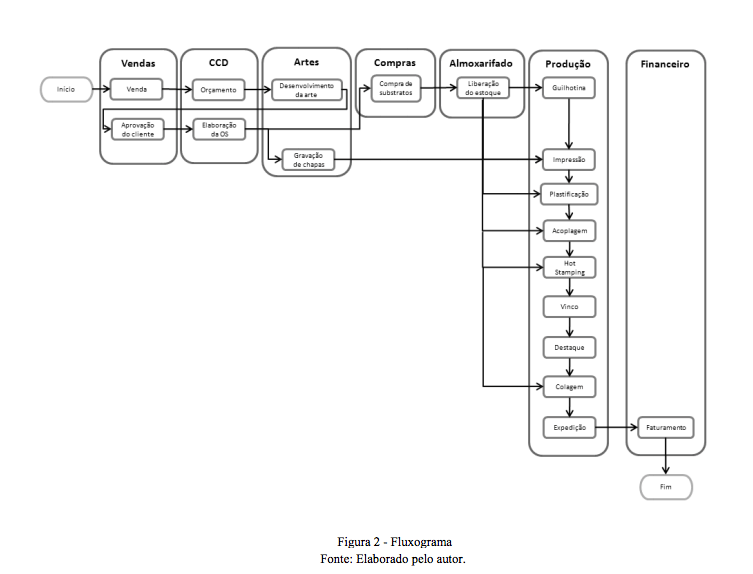
Source: Undergraduate thesis by Thaís Ferreiraopens in a new tab (in Portuguese)
How to apply this technique in the company:
- Start with the broadest steps of the process being analyzed;
- Observe how the activities actually work day to day;
- Draw the map connecting each phase with logical connectors.
A practical example is contract approval in the legal department. The flowchart shows exactly which desks the document passes through until the final signature.
Read also: Decision-making tools: how to choose the right one for your business?opens in a new tab
2. Ishikawa Diagram
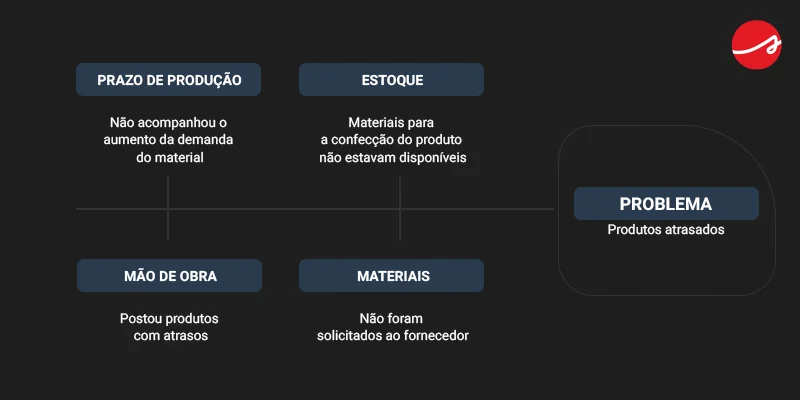
Also known as the cause-and-effect diagram, the Ishikawa Diagramopens in a new tab identifies the factors that generate a specific problem. It shows the structured relationship between the failures found and their origins.
The basic premise holds that every deviation has a root cause that needs to be investigated. That is why managers explore operational categories until they find the solution.
If you want to apply this methodology, Siteware prepared an exclusive resource. Download our customizable Ishikawa diagram spreadsheet for free and map your company’s failures.

Steps to build your diagram:
- Place the main problem at the right vertex of the chart;
- Divide the possible causes into broad categories;
- Run brainstorming sessions with the team to detail the factors.
See an example of the Ishikawa diagram:
3. Check Sheet
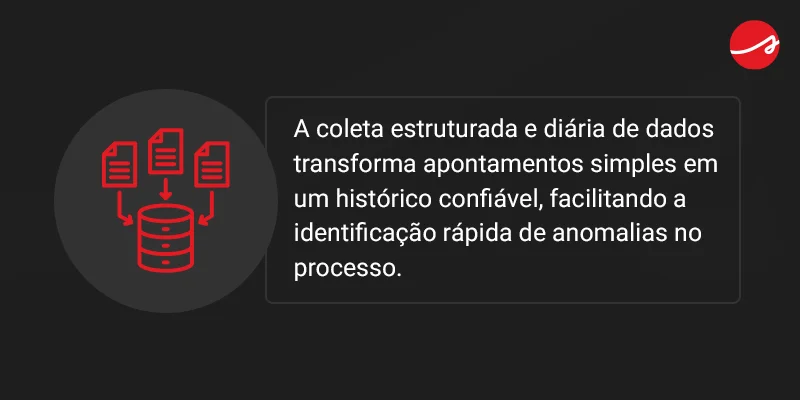
The check sheetopens in a new tab makes it easier to monitor daily processes quickly. The professional records data on structured forms to track how often certain events happen.
It also works in companies of all sizes because it is easy to implement. Disciplined filling in also creates a reliable historical database.
To help your operation, Siteware offers a completely free template. Download our check sheet now and optimize your team’s indicator collection.
4. Histogram
The histogram is a bar chart focused on showing the frequency distribution of the data obtained. You group the quantitative information into intervals to see the real behavior of the process.
So, it lets you identify behavior trends and variations that fall outside the acceptable standard. The visual representation greatly speeds up leadership’s statistical understanding.
Tips for building the chart:
- Gather the total volume of data collected in the operation;
- Organize the numbers into proportional intervals;
- Draw the columns respecting the proportion of each frequency.
A customer service coordinator, for example, uses the histogram to assess the variation in average support time during peak hours.
5. Pareto Diagram
The Pareto Diagramopens in a new tab combines a column chart with a cumulative percentage line. It is based on the 80/20 rule, which holds that most negative effects result from a few causes.
Thus, 80% of failures come from only 20% of the factors mapped. That way, management focuses its efforts and financial resources on what will bring the greatest immediate impact.
Key steps to create it:
- Classify the data and count the occurrences of each failure;
- Place the offenders in descending order on the horizontal axis;
- Add the cumulative line to show the weight of each problem.
6. Scatter Diagram
The scatter diagram uses a traditional Cartesian plane to evaluate the relationship between two distinct variables. Each point on the chart represents a pair of values observed by the team.
So, managers verify mathematically whether there is a direct, inverse or null correlation between the factors. This tests the hypotheses raised during improvement meetings.
Example of practical use: the human resources department uses the chart to cross the hours invested in technical training with the increase in the team’s productivity index.
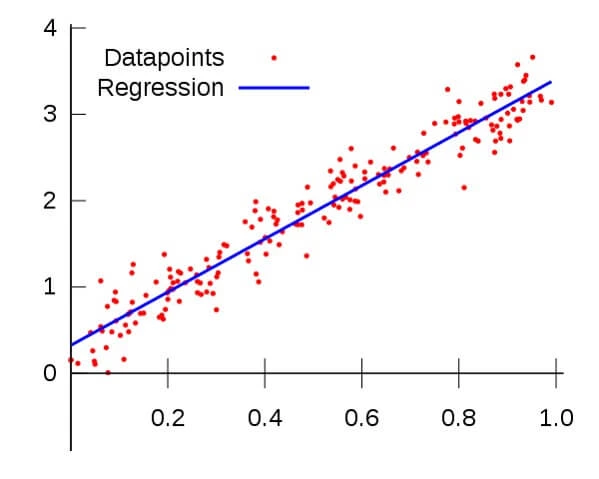
Source: Voitto
How to use the scatter diagram:
- Collect two groups of data and organize them in a table;
- Draw the diagram, assigning the causes to the X axis and the effects to the Y axis;
- Analyze the direction and strength of the relationship between the variables.
7. Control Chart
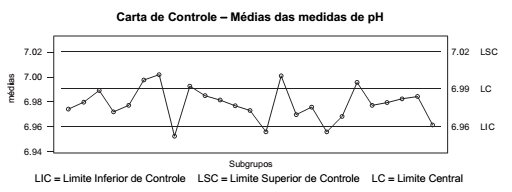
The Control Chart tracks process variations over time. The statistical chart defines upper and lower tolerance limits based on the history established by the organization.
If the measured indicators cross the delimited lines, the system flags serious instability. As a result, the team acts to correct the deviation before the defect reaches the end consumer.
Consumer goods factories use control charts to continuously monitor package weight at the filling stage, ensuring batch standardization.
Source: PortalISOopens in a new tab (in Portuguese)
How to use the control chart:
- Select the size of the group to be monitored;
- Record the measured variables;
- Identify deviations and reanalyze the data when necessary.
How do you integrate quality control tools with enterprise software?
Spreadsheets and templates are excellent starting points for structuring your analysis. However, for large corporations that manage thousands of data points, governance requires integrated technology platforms.
In this strategic scenario, Siteware offers the Stratws software, which makes it possible to use several quality tools within a single, robust system. The platform includes the Improvement Opportunities module, created to resolve deviations and apply action plans.
In addition, Stratws operates in full SOC 2 compliance and uses secure cloud infrastructure (Azure/AWS). This ensures maximum protection of your business’s strategic information throughout the entire performance control cycle.
Take the next step toward operational excellence
Quality tools structure the foundation of continuous improvement in high-performance organizations. Implementing these practices ensures that processes deliver precise, predictable results that satisfy the end customer.
However, scaling this management requires an excellent corporate system. Stratws centralizes data, automates follow-ups and delivers the visual dashboards your leadership needs to decide with confidence.
Transform your company’s governance with the market-leading solution. Talk to an expert and discover the impact of Stratws on your operational results!
Frequently asked questions
What are the 7 quality tools?
The set covers the flowchart, the Ishikawa diagram, the check sheet, the histogram, the Pareto diagram, the scatter diagram and the control chart.
What is the central goal of these practices?
The purpose is to identify production bottlenecks and promote continuous improvement. Regular application therefore reduces financial waste and increases the company's operational efficiency.
How do I choose the best methodology for my team?
The choice varies with the nature of the obstacle. To standardize paths, use visual maps such as the flowchart. To trace the origin of operational anomalies, apply models focused on cause and effect.
Why use management software to apply these tools?
Although spreadsheets and templates are useful at the start, specialized software such as Stratws centralizes data and automates indicator tracking. This ensures greater security, compliance and speed in decision-making.

About the author
Equipe Siteware
Content produced and reviewed by the Siteware team, curated by internal experts in strategic management and corporate performance.