
Management Methodologies
Eisenhower Matrix: what it is and how to build one
Learn what the Eisenhower Matrix is, how its four quadrants work and follow a step-by-step to build yours, with a free spreadsheet template.

The Eisenhower Matrix helps people who have many tasks and struggle to decide where to start. It separates what needs action now from what can be scheduled, delegated or dropped.
This text explains what the matrix is, how its four quadrants work and how to build yours, step by step.
Eisenhower Matrix spreadsheet
Prioritize your tasks in Excel or Google Sheets.
What is the Eisenhower Matrix?
The Eisenhower Matrix is a tool for prioritizing tasks and guiding decisions in organizations. The name comes from Dwight Eisenhower, the 34th president of the United States. In a 1954 speechopens in a new tab, he cited the idea that what is urgent is seldom important, and what is important is seldom urgent.
The matrix as we know it was popularized in 1989 by Stephen Covey, in the book “The 7 Habits of Highly Effective People”. It is drawn on a Cartesian plane that sorts activities by two criteria: urgency and importance.
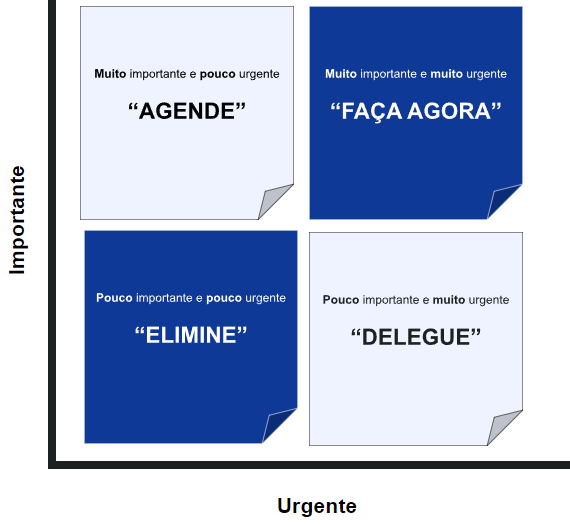
With it, the tool screens your to-dos and keeps you from spending time on what has little importance or little urgency.
Urgency and importance are not the same thing:
- important tasks are tied to reaching a goal or objective;
- urgent tasks are tied to the deadline and the consequences of delay for the company.
The idea is to give priority to tasks that have both traits, which improves productivity.
Benefits of the Eisenhower Matrix
The matrix is a time management tool that simplifies the work routine. It shows what you need to do now and what can wait.
These are the main benefits:
- prioritization of the tasks that are most urgent and important for the company;
- more organization and clarity about activities;
- faster execution of tasks;
- more assertive decisions, based on criteria.
How is the Eisenhower Matrix divided?
The matrix has four quadrants. Each one tells you what to do with the tasks that fall in it:
- Important and urgent: tasks to handle immediately, such as crises and imminent deadlines. Dealing with them prevents bigger problems.
- Important, but not urgent: tasks with no imminent deadline, which should be planned and scheduled, such as planning, personal development and long-term strategy. Prioritizing them keeps them from becoming urgent.
- Urgent, but not important: tasks that are pressing but do not contribute to your objectives. They should be delegated, automated or cut to a minimum.
- Not important and not urgent: tasks to avoid or do only when time is left, such as distractions and activities unrelated to your objectives.
How to build the Eisenhower Matrix step by step
To build the matrix, list your tasks and place each one in the “important” and “urgent” categories. A task can be important and not urgent, and the opposite also holds.
If you prefer, watch the video that explains the tool and how to build it:
Step 1: draw the Cartesian plane
Draw a Cartesian planeopens in a new tab: a square split by two axes, horizontal and vertical, which form four quadrants.
The vertical line represents the importance of tasks and the horizontal line represents urgency.
Step 2: define the important and urgent tasks
With the plane ready, list the tasks and categorize each one. Start with the first quadrant, for tasks that are important and urgent.
These to-dos have priority and cannot be postponed.
Step 3: define the important but not urgent tasks
In the second quadrant, place the important tasks that do not need to be done urgently. These are medium and long-term to-dos.
For example, delivering the annual balance sheet and your department’s financial projection is important, but not urgent when you are in the middle of the year.
Step 4: define the urgent but not important tasks
In the third quadrant, place the tasks with a short deadline but little impact on your objectives.
These to-dos can be delegated to other team members, which frees your time for the first and second quadrants.
Step 5: define the not important and not urgent tasks
In the fourth quadrant, place the tasks that are neither important nor urgent. This step shows what you should not spend time on.
These tasks can be dropped or done when your schedule has slack.
Eisenhower Matrix with Stratws
The matrix decides what to prioritize. What comes next is making sure the tasks in the first and second quadrants get done, with an owner and a deadline.
Created by Siteware, Stratws is a management platform that does not include a ready-made Eisenhower matrix, but it helps track execution. The feature called Tasks, in My Panel, gathers the manager’s and the team’s tasks, with deadline and status. They come from indicators, meetings, projects and Improvement Opportunities.
That way, the manager sees the real volume of work and pending items in one place, and prioritization becomes routine.
This video on our YouTube channelopens in a new tab covers time management:
Bring prioritization into the team routine
See how to record the opportunity, set the action plan and track the tasks.
Frequently asked questions
What is the Eisenhower Matrix?
It is a time management tool that organizes tasks into four quadrants, based on urgency and importance. The name comes from Dwight Eisenhower, who cited the idea in 1954, and the matrix was popularized by Stephen Covey in 1989.
What is the Eisenhower Matrix for?
It shows clearly what to do now, schedule, delegate or drop. It helps you avoid urgencies that add no value, focus effort on what matters and reduce overload by concentrating on strategic tasks.
What are the four quadrants of the Eisenhower Matrix?
Important and urgent: immediate deadline and high impact; important but not urgent: long-term strategic activities; urgent but not important: immediate matters of low value; neither: distractions and tasks with no practical value.

About the author
Equipe Siteware
Content produced and reviewed by the Siteware team, curated by internal experts in strategic management and corporate performance.